Slack reports
Automated summaries delivered to the channels your team already uses.
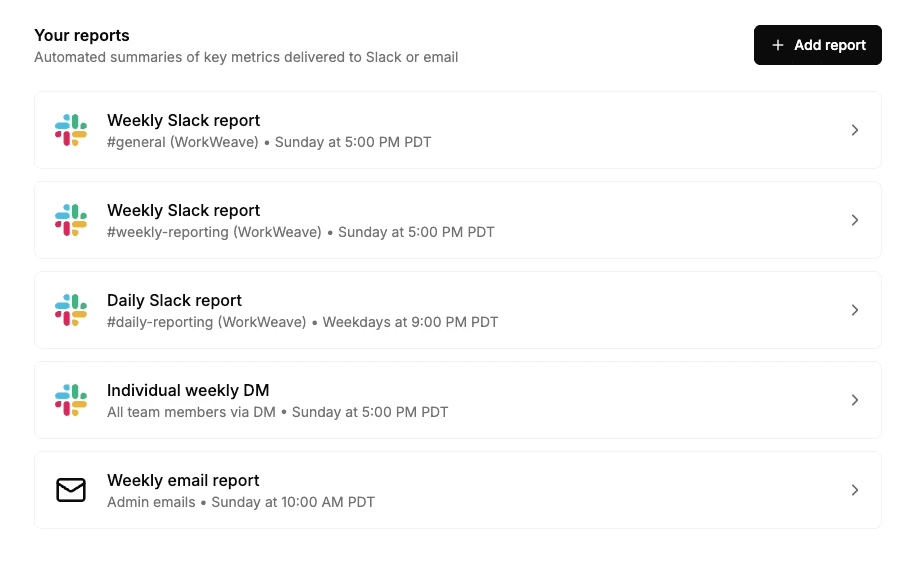
Weekly team report
A full team summary with insights and individual stats, delivered to a channel on your schedule. See what shipped, who contributed, and how the week compared to the last one.
Daily activity report
A quick snapshot of the previous day's engineering activity, delivered every weekday. Enough signal to start the morning without opening a dashboard.
Individual weekly report
Personalized metrics sent directly to each engineer via DM in their timezone. Engineers see their own output and trends without anyone else in the loop.
PR notifications
Real-time alerts when significant PRs are merged. Set a code output threshold so only meaningful work triggers a notification. Keeps leads aware of high-impact changes as they land.
MCP server
Connect any AI agent to your Weave data
Using the Model Context Protocol. Agents can query metrics, drill into PRs and tasks, explore team structures, and filter by repo, time period, or AI tool.
Native compatibility
Claude, Cursor, VS Code, Windsurf, and any MCP-compatible client
Full dataset access
Team velocity, PR history, codebase patterns, AI usage
REST API
Pull metrics programmatically
For custom dashboards, internal tools, or scheduled exports. Query code output, cycle time, review turnaround, AI usage, and more.
Autonomous task tracking
Multi-file refactoring, bug fixes, task completion
Simple auth
Authenticated with a single API key
Know what's being used, by whom, how much it costs, and whether it's working.
AI Usage gives you the full picture.